Golf cart CRM in 2026: 7 things a dealer-specific system gets right (that Salesforce doesn't)
Why golf cart dealers outgrow Salesforce, HubSpot, and Pipedrive in 90 days — and the seven things a dealer-specific CRM does that a generic one structurally can't.
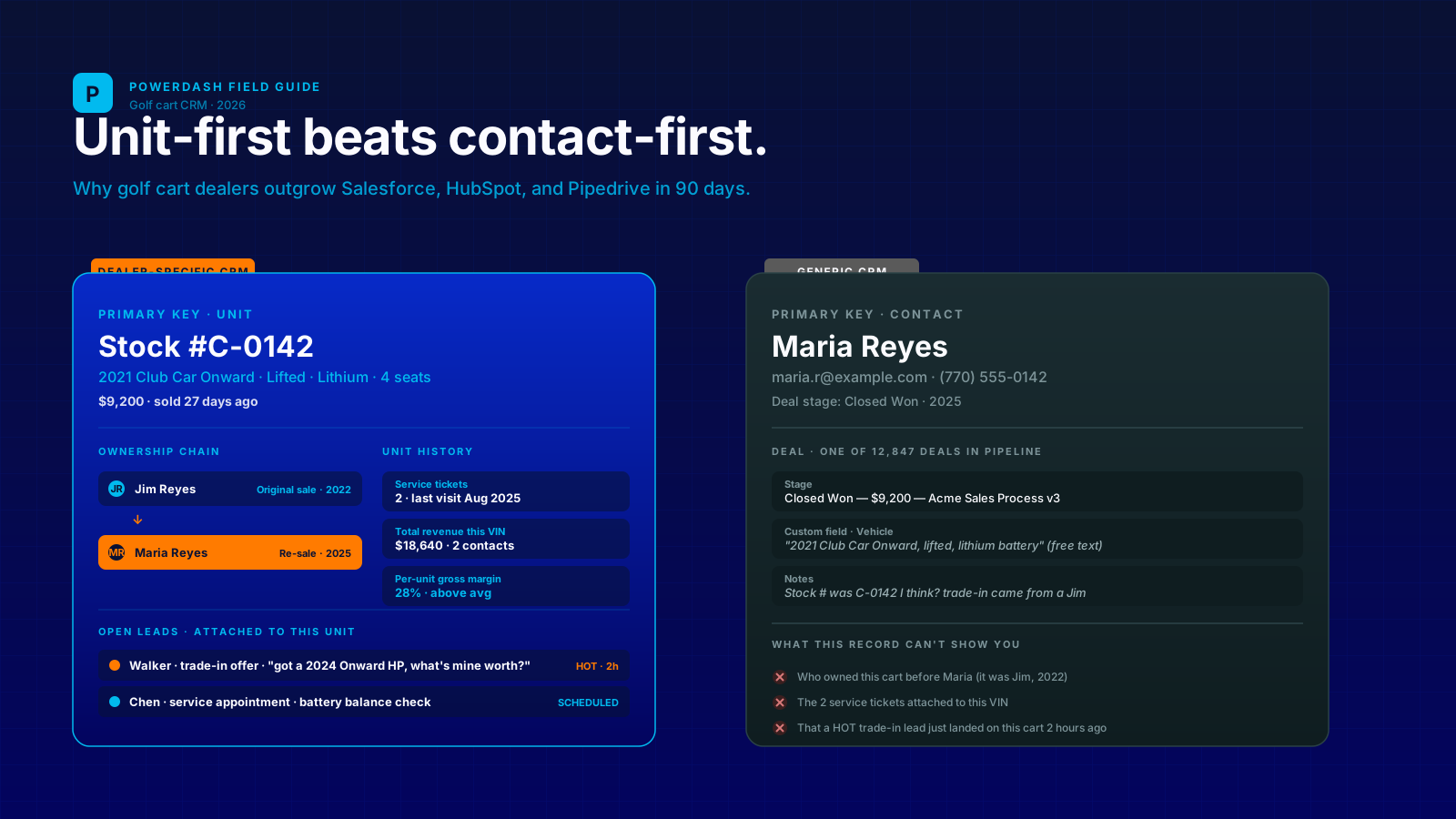
Every couple of months a dealer emails us some variation of the same story. They started with Salesforce. Or HubSpot. Or Pipedrive. Or the free tier of Zoho. About 90 days in they hit the same wall: the tool tracks people, not carts, and a golf cart dealership is a cart-first business pretending to be a people-first one.
This is a post we've been meaning to write for a while. What follows isn't a "Powerdash is best" pitch (although yes, we make the thing). It's a structural look at why generic CRMs break for golf cart dealers, what a dealer-specific system actually does differently, and what you should do today if you're already locked into the wrong tool.
The short answer
A golf cart CRM is not a contact database. It's a unit-centric database — where each cart on the lot is the load-bearing object, and contacts (leads, buyers, renters, service customers) hang off the units they touch. Generic CRMs invert this and make every interaction start from a person. That difference looks small until you try to model a trade-in, a rental booking, a service ticket, or a re-sale of the same cart three years later.
Why dealers outgrow Salesforce / HubSpot / Pipedrive in 90 days
Three patterns we've heard a hundred times:
- The "two tools" problem. The CRM holds contacts; a spreadsheet or the website holds inventory. Every lead requires copy-paste between them. By month 3 the spreadsheet is stale and the dealer can't trust either one.
- The "deal stage" problem. Generic CRMs model sales as a pipeline of contacts: new → qualified → proposal → won. Cart sales don't fit. A buyer might inquire on Cart A, trade in Cart B, finance Cart C through you, then come back for service on Cart A nine months later. None of that is one deal.
- The "no unit history" problem. When you sell a cart, then take it back as a trade-in two years later, then re-sell it — that's the same physical asset with three customer touches. A generic CRM can't show you the chain because the customer is the primary key. The cart isn't.
None of these are bugs. They're the natural consequence of using a tool built for B2B SaaS sales to run a B2C/B2B used-and-new powersports business. The shapes are different.
The 7 things a dealer-specific CRM gets right
1. The unit is a first-class object, not a deal stage
In a dealer CRM, the cart has its own record with its own history. VIN, stock number, condition, lifted/stock, battery chemistry, year, make, model, trim, current owner (if any), reserve status. Contacts attach to units, not the reverse.
The practical payoff: you can pull up "every interaction this 2021 EZ-GO Liberty has ever had" — initial sale to Jim in 2022, trade-in from Jim in 2024, service work in 2024, re-sale to Maria in 2025, lift kit installation last month. Same cart, four customers, one record. Generic CRMs can't show you this without three custom objects and a Zapier.
2. Lead source means buyer intent, not marketing attribution
A general CRM tracks lead source so you can credit a marketing channel. Useful, but not enough.
A dealer CRM tracks lead kind — financing inquiry, trade-in offer, service appointment, parts question, rental booking, walk-in interest — because each kind needs a different reply within a different SLA from a different person. A trade-in offer needs same-day acknowledgment from the sales manager. A service inquiry can wait until tomorrow morning. A rental booking is auto-routable. If your CRM lumps all of these under "Lead Source: Website Form," your team treats them all the same and you lose the high-intent ones.
3. Service history travels with the cart, not the customer
This one trips up every general CRM. When Maria buys a 2021 Liberty from you, then sells it to her brother privately, the brother brings it in for a battery swap two years later. Who owns the service history?
The cart does. A dealer CRM pins service tickets to the unit's VIN, so when the brother walks in, the tech can pull up "last serviced by us on July 14, 2023 — controller replaced under warranty, prior owner was Maria Reyes". The customer record is fresh; the cart record is rich. In Salesforce you'd be reading hand-typed notes on someone else's contact card.
4. The inventory and the CRM are the same database
The single biggest time savings of a dealer-specific tool: when a sales rep updates a cart's price, condition, or status, the website updates the same minute. When a lead form fires on the storefront, it lands in the inbox already attached to the right unit — including the photos the visitor was looking at when they submitted.
With a generic CRM + a separate website + a separate inventory spreadsheet, that workflow takes three tools, two copy-pastes, and almost always one forgotten "mark this one sold" step. By the time the rep forgets, two more leads have inquired about a cart that's already gone.
5. Rentals and sales live in one customer record
If you do rentals, the same person might rent twice a year and buy from you in year three. A generic CRM lets you tag them, sure. But it doesn't show you "this customer has rented from us 4 times totaling $1,800, has a clean return record, and just inquired about purchasing a unit similar to her last rental."
That single view is the difference between a $0 follow-up email and a $9,000 sale. We've watched dealers convert rental customers into buyers at 3-4× the rate of cold leads — but only when the CRM lets them see it. More on this in our rental software writeup.
6. Lead routing is unit-aware
The rep who sold Maria the Liberty in 2022 has a relationship. When she comes back to trade it in, you want that lead going to that rep — not a round-robin assignment to whoever's up next.
A dealer CRM auto-routes leads to the rep with the strongest tie: prior sales rep on the same unit, then prior sales rep for that customer, then round-robin only as a fallback. Generic CRMs can do round-robin assignment, but they don't know which rep sold which cart.
7. Reports default to per-unit margin, not per-deal revenue
Salesforce's default sales reports show closed-won revenue. That's a SaaS metric. For a golf cart dealer it's misleading — selling a $14K LSV at 12% margin and a $4K used cart at 35% margin look very different on a margin chart and identical on a revenue chart.
A dealer CRM defaults to per-unit gross margin reports: average margin by make, by condition, by sales rep, by month, by source of lead. Within a week of switching from revenue-first reports to margin-first, most dealers tighten their pricing on a category they didn't realize was running thin.
Three dealers, three CRM stories
The dealer who tried HubSpot first
Two-rep shop in central Texas. Started with HubSpot Sales Free + a Google Sheet for inventory. Two months in, the sheet had 47 rows and a "Status" column with values like "sold (?)", "sold pending payment", "sold but maybe coming back as trade." Every lead form fired a HubSpot ticket with a unit name in plain text. Reps were copy-pasting back and forth between the sheet, HubSpot, and the Wix site.
What they outgrew: not HubSpot's CRM features (those are fine), but the gap between the CRM and the inventory. Switched to a unit-centric DMS in month 4. The first thing they noticed was the inbox now showed "Inquiry on Stock #C-0142 (2021 Club Car Onward Lifted)" with the cart's full record one click away. No copy-paste.
The three-location shop that built a custom Airtable
This one is heroic and we respect it. A 3-location dealer with a developer-curious owner built an Airtable database with a Unit table, a Contact table, a Sale table, and a Service Ticket table, all linked. Wrote about 600 lines of automation script. Worked for 18 months.
What broke: nothing technical. The owner ran out of patience maintaining it. New features (rentals, parts e-commerce, e-sign waivers) each required another 80-100 lines of Airtable script + a Zapier. The marginal cost of every new business need kept climbing. They moved to a packaged dealer DMS in month 19 and got their evenings back.
The rental-heavy operator on Salesforce
A coastal Florida dealer with a 22-cart rental fleet plus a small sales lot. They were on Salesforce Sales Cloud, $75/user/month for 4 users = $300/mo, plus an outside agency managing the website at $1,800/mo. Rentals were tracked in a separate calendar tool.
Switched to a unified DMS in 2024. Hard numbers from their first quarter: rental utilization climbed from 58% to 74% just from being able to see "this returning rental customer hasn't booked in 30 days" inside the CRM and auto-firing a follow-up. Sales conversion from rental customers tripled. Total monthly software spend dropped from ~$2,100 to ~$500.
If you're locked into a general CRM today
Switching tools mid-year feels risky. Two ways to de-risk it.
- Export the contact database, not the deal data. Contacts move cleanly between CRMs. Deal records, custom fields, and pipeline stages almost never do, and most of them aren't worth migrating anyway. Start fresh on the new system with current open leads; archive the rest in cold storage.
- Run them in parallel for 30 days. Put new lead forms into the dealer CRM, keep the generic CRM read-only for historical lookups. By day 30 you'll either be over the bridge or you'll have learned which tool's gaps are deal-breakers for your specific shop.
The dealers we work with usually budget 2-4 evenings for the cutover. The 18-month Airtable shop above did it in a weekend.
Honest take on the dealer-specific CRMs out there
If you're shopping right now, the real options come down to a handful. We covered the full landscape in our 2026 dealer software field guide; the short version on the CRM-specific question:
- Dealer Spike — bundles a CRM with their website product. Powerful but expensive and the UX hasn't been touched in years.
- DX1 — solid CRM module, motorcycle-industry roots, golf cart support is bolt-on rather than native.
- Powerdash — that's us. Built golf-cart-first, includes the storefront, inventory, rentals, parts, and CRM in one $499/mo flat fee. 60-day free trial. Start one.
- The DIY route (Airtable, Notion, HubSpot Free) — fine for the first 90 days, painful by month 6 when your business gets non-trivial.
TL;DR
- A golf cart CRM is unit-centric, not contact-centric. The cart is the load-bearing object.
- Generic CRMs (Salesforce, HubSpot, Pipedrive) break in three predictable ways: two-tools problem, deal-stage problem, no-unit-history problem.
- The seven things a dealer-specific CRM does: unit-first records, intent-based lead source, cart-attached service history, unified inventory+CRM, rentals+sales in one record, unit-aware lead routing, margin-first reporting.
- If you're already on a general CRM, parallel-run for 30 days. Don't migrate deal data; migrate contacts and start clean.
- Powerdash includes a golf-cart-first CRM in our $499/mo flat fee. 60-day free trial, no card.
And if you want every other Powerdash-vs-alternative breakdown side by side, our compare hub has each option golf cart dealers actually look at.